
Download 4Peaks – Free DNA Chromatogram Viewer & Editor
Overview
4Peaks is a free, cross‑platform chromatogram viewing and editing application designed specifically for molecular biologists, geneticists, and anyone who works with DNA trace files. Built with a minimalist user interface, the program delivers a powerful set of tools without the clutter of commercial packages. Whether you need to open a raw SCF file from an ABI sequencer, edit questionable base calls, or compare a newly sequenced fragment against NCBI’s nucleotide database, 4Peaks offers a streamlined workflow that speeds up routine analysis.
The software supports the most common trace formats—including SCF, ZTR, EXP, BIO, and CTF—so users no longer have to run external conversion scripts before they can view their data. In addition, 4Peaks includes a basic BLAST client, a flexible motif‑search engine, and a plug‑in architecture that lets you extend functionality with custom scripts. The application is freely downloadable, updates are delivered securely, and the program runs on both Windows and macOS, making it a versatile choice for labs that operate mixed operating systems.
Because it focuses on core DNA analysis features, 4Peaks is especially appealing to researchers who need a reliable, no‑frills tool for day‑to‑day sequence validation, mutation visualization, and quick generation of publication‑ready figures. Its PDF export function ensures that you can turn any trace into a high‑resolution image suitable for journals, presentations, or internal reports. Overall, 4Peaks combines simplicity with depth, offering a cost‑free alternative to premium chromatogram software while maintaining the essential capabilities that modern molecular biology demands.
Key Features & Capabilities
- Multi‑format Support: Native opening of SCF, ZTR, EXP, BIO, and CTF trace files without conversion.
- Motif Search Engine: Built‑in search bar with predefined motifs and the ability to create custom patterns for rapid identification of sequence features.
- Translation Dictionaries: Multiple codon tables let you translate DNA to protein in real time, facilitating mutation impact assessment.
- Integrated BLAST Client: Directly query NCBI’s nucleotide database from within the app, retrieve alignments, and view similarity scores.
- Plug‑in Architecture: Support for user‑developed extensions, allowing labs to add specialized analysis tools or automate repetitive tasks.
- Trace Editing Suite: Edit base calls, crop low‑quality regions, and manually adjust peak scaling both horizontally and vertically.
- Region Marking & Bookmarking: Highlight and label areas of interest so you can return to them instantly during later review.
- High‑Resolution PDF Export: Generate publication‑ready figures with customizable layout, colors, and annotation options.
- Cross‑Platform Compatibility: Native builds for Windows 10/11 and macOS Catalina + , ensuring seamless operation across lab computers.
- Secure Free Updates: Automatic download of bug fixes and feature enhancements via a built‑in updater, all signed with a trusted certificate.
Why These Features Matter
In a research environment where time is often the limiting factor, the ability to open any trace file directly saves valuable minutes that would otherwise be spent on file conversion. The motif search engine reduces manual scanning of long sequences, letting you pinpoint promoters, restriction sites, or disease‑associated patterns with a single keystroke. Translation dictionaries are essential when you need to understand how a nucleotide change will affect the encoded protein—something that can be crucial for functional studies or clinical diagnostics.
The integrated BLAST client removes the need to switch between a web browser and the desktop, streamlining comparative genomics workflows. Meanwhile, the plug‑in system future‑proofs the software; as new analysis methods emerge, developers can create modules that plug directly into the 4Peaks interface, preserving the familiar environment while expanding capabilities. The editing tools provide precise control over ambiguous reads, and the PDF export ensures that every figure you generate meets the high standards required by scientific journals.
All of these capabilities are bundled into a free, lightweight package that updates securely, making 4Peaks a compelling alternative to costly commercial suites.
Installation, Usage & Compatibility
Step‑by‑Step Installation Guide
Downloading and installing 4Peaks is straightforward. Follow these steps to get the software up and running on your workstation:
- Visit the official 4Peaks download page and click the Download for Windows or Download for macOS button, depending on your operating system.
- The installer file (EXE for Windows, DMG for macOS) will be saved to your default downloads folder.
- Run the installer. On Windows, you may need to grant administrator permission; on macOS, drag the 4Peaks icon into the Applications folder.
- During the installation wizard, select the default installation path or choose a custom location. Accept the license agreement and click “Install”.
- Once installation completes, launch 4Peaks from the Start menu (Windows) or the Launchpad (macOS). The first launch will trigger a secure update check to ensure you have the latest version.
Basic Workflow for New Users
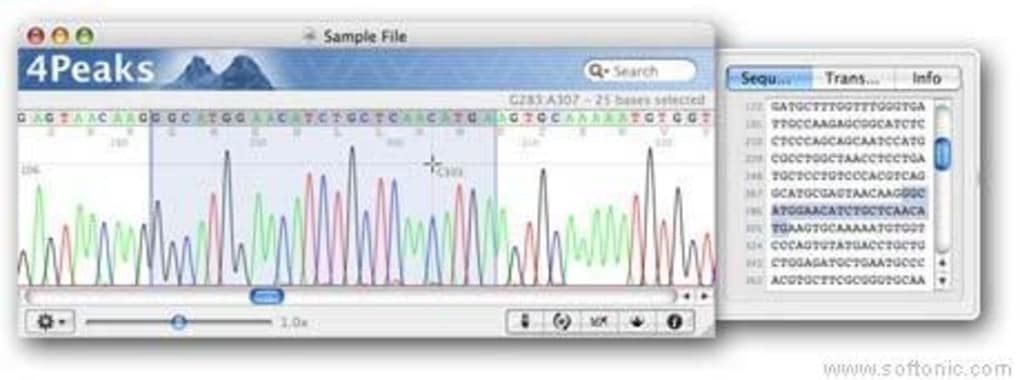
After launching the program, you’ll be greeted by a clean main window divided into three panes: the trace view, the nucleotide/ amino‑acid sequence panel, and the annotation toolbar. To open a file, use File → Open or drag and drop a supported trace file onto the window. The trace will render instantly, showing peak heights and base calls.
Use the Search bar to locate motifs, or click the BLAST icon to launch a remote query. Editing tools are accessible via the toolbar: select a base, right‑click to correct the call, or use the Crop function to remove noisy sections. When you’re satisfied with your analysis, choose File → Export → PDF to generate a high‑resolution figure.
All settings—including custom motifs and plug‑ins—are saved in a user profile, so you can pick up where you left off in subsequent sessions.
Supported Operating Systems
4Peaks runs on the following platforms:
- Windows 10, Windows 11 (64‑bit)
- macOS Catalina (10.15) and later (Intel & Apple Silicon)
There is currently no native Linux build, but the application can be run on Linux using Wine or a virtual machine if needed. System requirements are modest: a 1 GHz processor, 2 GB RAM, and 100 MB of free disk space. The lightweight design ensures smooth performance even on older laboratory computers.
Pros, Cons & Frequently Asked Questions
Pros & Cons
- Pros
- Completely free with regular, secure updates.
- Supports all major trace file formats natively.
- Intuitive UI that requires minimal training.
- Built‑in BLAST client eliminates the need for a web browser.
- Extensible plug‑in system for custom workflows.
- High‑resolution PDF export for publication‑ready figures.
- Cross‑platform availability (Windows & macOS).
- Cons
- No native Linux version (requires workaround).
- Advanced statistical analysis tools are limited compared to premium suites.
- Plugin ecosystem is smaller than that of larger commercial products.
- Some users report occasional UI scaling issues on high‑DPI displays.
FAQ – Your Most Common Questions Answered
Is 4Peaks really free, or are there hidden costs?
Yes, 4Peaks is completely free for both personal and academic use. All core features, including file import, editing, BLAST searching, and PDF export, are available without any licensing fees. The developers do accept donations, but they are optional.
Can I use 4Peaks on a Mac with Apple Silicon (M1/M2) chips?
Yes. The macOS build is a universal binary that runs natively on both Intel and Apple Silicon processors, providing smooth performance on the latest MacBook models.
How does the built‑in BLAST client work, and do I need an internet connection?
The BLAST client sends your query sequence to NCBI’s public BLAST service over HTTPS, retrieves the alignment results, and displays them directly within 4Peaks. An active internet connection is required for each query, but the rest of the application works offline.
Can I import custom plug‑ins, and where do I find them?
Yes. 4Peaks includes a plug‑in manager under Tools → Plug‑ins. You can download community‑created extensions from the official GitHub repository or develop your own using the provided API documentation.
Is there a way to batch‑process multiple trace files?
While the core UI focuses on single‑file analysis, you can use a simple Python or Bash script to call 4Peaks in headless mode for batch conversion or basic quality checks. The plug‑in framework also supports batch workflows if you install a suitable extension.
Conclusion & Call to Action
4Peaks stands out as a robust, free DNA chromatogram viewer and editor that balances simplicity with essential scientific functionality. Its support for all major trace formats, built‑in BLAST client, and extensible plug‑in system make it a practical choice for academic labs, teaching environments, and even small biotech startups that need a reliable tool without the overhead of expensive licenses. While it lacks a native Linux version and some high‑end statistical modules, the benefits—free access, cross‑platform compatibility, and a clean user experience—far outweigh these minor drawbacks for most routine sequencing tasks. If you’re looking for a secure, regularly updated software solution that lets you visualize, edit, and publish DNA trace data in minutes, 4Peaks is ready for download today.
Ready to streamline your DNA analysis workflow? Free USD – click the link above to get the latest version for Windows or macOS and start improving your sequence validation process right now.







